Showing posts with label pc2pc. Show all posts

TeamTalk v. 3.2

License : Freeware
Price : FREE
OS : Windows All
Size : 1.63 MB

This is the latest version of TeamTalk which is a voice conferencing application (or internet phone). TeamTalk allows you to talk to friends and colleagues using the internet as audio carrier. With TeamTalk any number of people can participate in a conversation and is only limited by the bandwidth you have available. Each user can choose his or her own audio quality which also determines the throughput required to each user. TeamTalk allows a throughput between 560 - 5850 bytes/sec. per user (so make sure those unlucky ones with a 56K modem are able to receive at your selected audio quality).

Features:
  • Supports 8, 16 and 32 KHz audio for both low- and high-bandwidth users.
  • Low lag by using audio broadcasting and no buffering.
  • Throughput between 560 bytes/sec. and 5850 bytes/sec. per user.
  • Packetloss resistant.
  • Hotkeys and voice activation.
  • Individual volume.
  • Denoising of outgoing audio.
  • Channels with topics and passwords.
  • Positioning of participants using 3D sound.
  • Unicode-enabled to support multiple languages.

SoliCall 1.0.12

License : Freeware
OS : Windows 2K/XP
Size : 748 KB

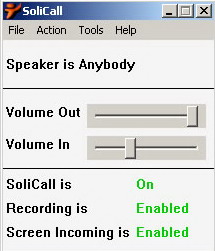
SoliCall has developed an innovative and original software that will help VoIP users to reduce unwanted noises during calls, in real time. Screaming kids? Barking dogs? Keyboard ticking? With SoliCall it will sound less disturbing than it really is.

This free beta version is aimed at improving the sound quality when making any type of VoIP call (e.g. PC-to-PC, PC-to-Phone). SoliCall is designated to reduce ambient sounds that the speaker may have. Its noise reduction performance can be enhanced by tuning it to a specific speaker. SoliCall can also screen the incoming audio.

Ticking on your keyboard? The phone rings? Your kids play loudly in the other room and you just don't want the other party to be continously disturbed by all these noises? SoliCall can help. Whether you use Skype, Yahoo Messenger or Google Talk, SoliCall will make you sound more professional and more discrete.

There are other direct advantages for our users. Enjoy and hear SoliCall's capabilities yourself by using our Screen Incoming Audio feature, which minimizes background noises coming from the other side of the line. In addition, you get an Automatic Recorder which allows you to record and save all of your conversations in one library.


Google Talk 1.0.0.96

Freeware
OS: Windows All
Size: 1.45 MB

Google Talk description

Click to read our editor’s review for Google Talk
They say talk is cheap. Google thinks it should be free. The new messenger brought to you by Google enables any user to call or send instant messages to friends anywhere in the world for free–anytime.

Here are some key features of “Google Talk”:

· Flexiblility: Get in touch how and when you want to–over email, IM or a call
· Quality: Talk through your computer but hear your friends as if they were in the same room
· Convenience: Your Gmail contacts are pre-loaded into Google Talk so inviting or talking to your friends is just a click away

Google Talk is not a telephony service and cannot be used for emergency dialing

Requirements:

· Google Talk is in beta and requires a Gmail username and password.

Feature Add:

File Transfer
With this top requested new feature, you can send unlimited files and folders to your friends through Google Talk. There is no restriction on the file type or size and the peer-to-peer transfer is fast and reliable.
File transfer
Voicemail
If your friends aren’t around to answer your call, you can leave them a voicemail message instead. Just record your voice after the “Meep” and your friends will get an email to their Talk contact address with the voicemail attached as an audio file. They can play your message when they check their email and save it for as long as they want.

Music Status and Music Trends
Listening to music while chatting on Google Talk? Now you can let your friends see what you’re listening to by selecting “Show current music track” in your status menu. Your status message will change when your song does!
You can also choose to contribute your music tastes to Google Music Trends, and check out what Google Talk users are listening to across the world.
Music status